External Micro-SD Adapter Upgrade Instructions.

To complete the upgrade, you will need a 20mm carbide hole saw to drill through the aluminum box to mount the remote micro-SD housing.

71Rq7ZAaNLL._SL1500_.jpg

Before starting, it is best to remove the Unity controller to be able to work on it more easily.

First, you will want to locate the drill point on the top side of the box.  

There is a 3d printable bracket that can help with this, or use a ruler/measuring tape to mark the drill point.

locator.jpg

Make sure the box cover plate is removed so that you can see and verify there is clearance inside the box. 

PXL_20250417_180214721.jpg

Next, drill the hole through the aluminum box, being very careful not to allow the bit to run inside the box.

drill.png

Once the hole is made, if needed, you can clean the edges with a deburring tool or razor knife if there are any sharp metal filings left.   

Very Important: Be sure to vacuum or blow out all of the aluminum chips so that they do not damage any of the components inside.

PXL_20250417_180241346.jpg

Next, remove the micro-SD card from the housing on the board.  There are videos on YouTube showing how to do this.  See Here.

Next, install the remote micro-SD housing by passing the extension cable through the outside of the box and running the cable through the back nut.  Tighten the nut on the inside of the box, and you can rotate the housing on the outside to help with this.

inst.png

Now, align the tip end of the extension cable into the SD holder on the control board and close the hinged clamp. This can be a little tricky so be patient. 

inst2.png

Now you can re-install the micro-SD into the new housing. 

PXL_20250417_181006796.jpg

 Lastly, test the unit out by plugging the controller into the main power and Ethernet before re-mounting the control box on the filtration unit, in case you need to re-seat the extension on the board. Once you verify that the controller and new SD adapter are working correctly, you can reinstall the Unity controller onto the filtration unit.

Downloads


Still need help?

Our support team can help with anything this article doesn't cover. Contact Superior Float Tanks support.

Flow Switch (Disabled) Error Message troubleshooting and fixing

This is the tech details to address when you have a flow switch error.  

Capture6.PNG

When the error is "NO FLOW DETECTED" that indicates that the pump is running but water is not flowing through the system and pressing the flow switch into the "ON" position.  

This could indicate that the saline solution has crystalized and is not allowing water flow, the water level could be low and the pump sucked in air and is air-locked/cavitated, a foreign object is blocking the flow,  or the flow switch is broken in the "OFF" position. 

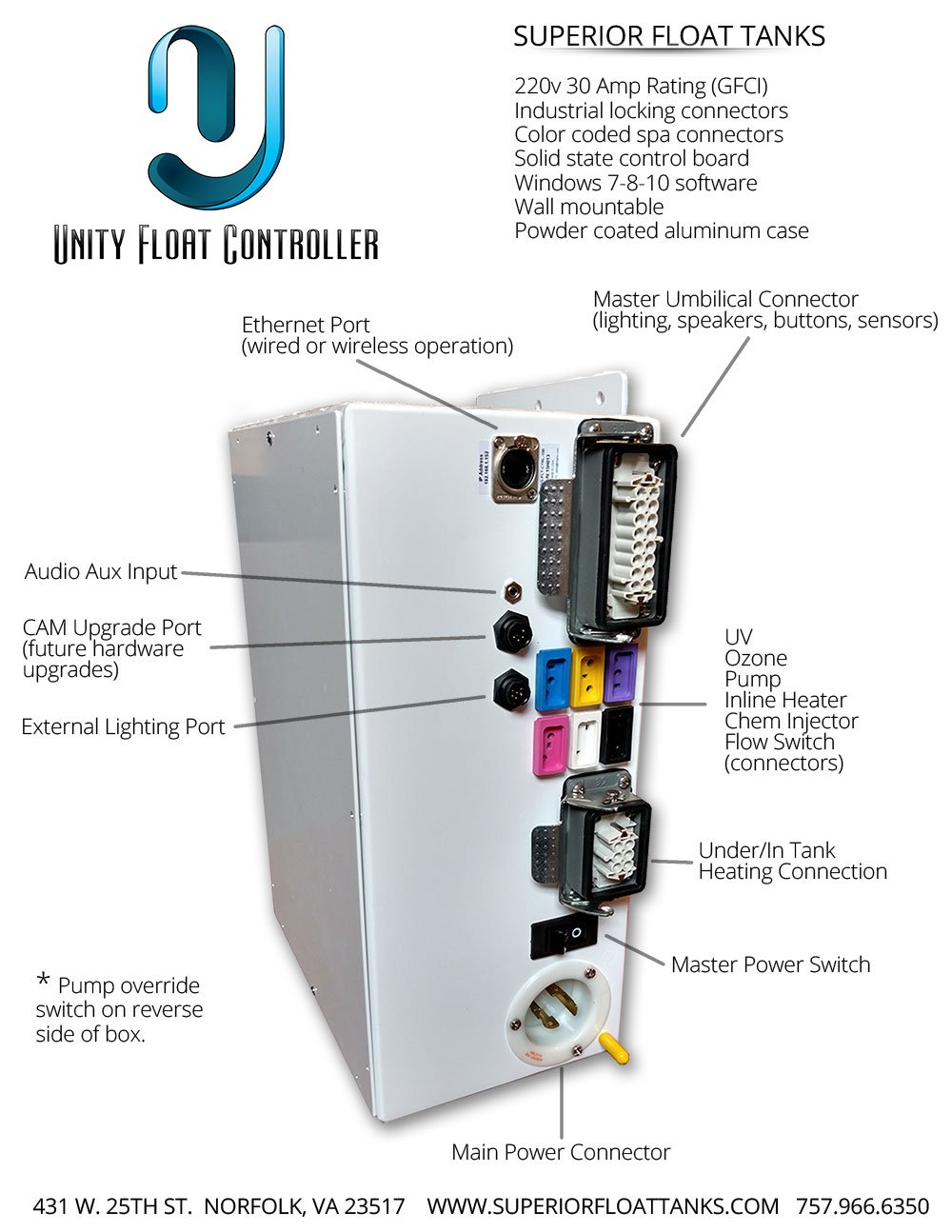
Additionally, this error can occur if you turn off the "pump override switch" on the Unity control box when changing filters or during servicing. *See Picture Below* 

PXL_20241216_201802237.jpg

The tank will go into the disabled state and shut down to protect the pump, heater, and UV from staying on and damaging the components.

Power cycling the tank/filtration unit will clear the error. 

PXL_20241216_201754530.jpg

_______________________________________________________________________________________________________________

Capture4.PNG

When the error is "FLOW DETECTED WHILE PUMP OFF" it indicates that the flow switch is either stuck or broken in the "ON" position when the pump is not running. 

The filtration/tank will shut down to protect the heater from boiling the water and possibly catching fire and/or causing the UV bulbs to stay on and damage the o-ring seals which can cause leaking in the UV/Ozone unit.

Power cycling the tank/filtration unit will clear the error.  When the tank re-boots it will first look at the flow switch position and if it still sees that the flow switch is in the "ON" position it will immediately go back into the disabled state. 

_______________________________________________________________________________________________________________

In both instances, you can bypass the error immediately with the flow bypass button. 

Capture2.PNG

Capture5.PNG


Still need help?

Our support team can help with anything this article doesn't cover. Contact Superior Float Tanks support.

Unity Control 3.7.1 Software and Firmware

This is the latest release of the Unity Float Control Software 

Unity Version 3.7.1 

Included and required are matching firmware files 

Float_Ctrl_v3_5_6

You will need to install the new Unity version and then update each tank with the new firmware files. 

https://www.youtube.com/watch?v=XNTyMKhU2_s

Change Log:

This build includes software monitoring of the flow switch in both the open and closed positions and will stop the filtration system if the flow is not reading while the pump is running after 10 seconds. 

Capture6.PNG

Additionally, if the flow is stuck in the "on" position while the pump is off it will alert and let you know that the flow switch is defective. WARNING : It is very important to not use the pump override switch while the flow switch is stuck in the on position.  This could lead to the UV bulbs overheating their O-rings causing a leak as well as the inline heater staying on and burning up.  The idle heating of the water should be switched over to the in-tank heaters immediately with the "Pump Schedule Enabled" setting to prevent the main heater from turning on in addition to unplugging the main inline heater from the control box until the flow switch is replaced with a new one. 

Capture4.PNG

An alert will be displayed on the software along with a Flow Bypass button to turn the pump back on for a period of 2 hours.  

Capture1.PNG

Capture2.PNG

To reset the alert back to normal just power cycle the control box system. 

Additionally, there is now a "Temperature Offset" setting in the Advanced Config screen to adjust the temperature display and match the actual solution temperature.  This is just a display change and does not change the temperature set points. 

  Capture3.PNG

Lighting profiles have been updated with standard RGB colors as well as brighter options. 

Downloads


Still need help?

Our support team can help with anything this article doesn't cover. Contact Superior Float Tanks support.

Updated Lighting Profiles

These are the updated lighting profiles for download.  

Copy them to the lighting profiles folder inside of the Unity install folder

Downloads


Still need help?

Our support team can help with anything this article doesn't cover. Contact Superior Float Tanks support.

Latest Software Files.

The current software version is 3.6.10 and can be downloaded from the link below. 

Unity_3.6.10_installer.exe

Additionally the "SD CARD CORE FILES" can be downloaded, extracted, and copied to a blank microSD card for replacing the MicroSD card in case of corruption. 

Included are the stock Messages folder MP3 files, enet.cfg file, and the float control .bin and .info files.  

SD_CARD_CORE_FILES

Music track files would need to be copied separately. 

See videos for removing and reinstalling the MicroSD card from the Unity Control box. 

Removing the MicroSD card.

 Reinstalling the MicroSD card.


Still need help?

Our support team can help with anything this article doesn't cover. Contact Superior Float Tanks support.

Connection Issues

When having a lost connection, make sure all hardwiring is secured, turned on, and connected. If still getting a connection lost signal, take the following steps:

1. Turn off the Unity program
2. You can also turn off your router
3. On the white control box on the filtration unit, turn off your power for 10 seconds and cut it back on. (This is the horizontal switch on the side where everything plugs in)
4. Once it's back on, look inside your tank to see if the main light is on. If the main light does not come on check the breaker
5. Turn the router back on
6. Reopen Unity
7. If you don't automatically connect, click on system configuration
8. Toggle off the unit, then click on the rectangle drop box to see if you have an IP address.
9. Click on the IP address, and toggle back on the unit.

If you perform the above operations, and you still do not connect: You will look at your firewall (It is listed as Float First, and both boxes should be checked under apps firewall). If you delete the Float First section from the firewall, when you reopen the software it will pop up again with the firewall settings, you will need to check both boxes.


Still need help?

Our support team can help with anything this article doesn't cover. Contact Superior Float Tanks support.

Micro-SD Card removal and re-programming

The following are the details on removing the Micro-SD card, re-programming, and replacing the card.  

This first video shows how to unlock the SD card clamp so the card can be removed from the control board. 

You can use the Micro-SD to SD card adapter if needed to insert into your reader.  

001.jpg

Lastly, this video shows how to re-install the SD card onto the board and then secure the clamp. 


Still need help?

Our support team can help with anything this article doesn't cover. Contact Superior Float Tanks support.

Generic Intro and Exit Scripts

One of the key features in the Unity Control System is the intro and post-float messages. 

The intro message will play when a session is started. This track will always play at the highest set volume level and acts as a final instruction for new floaters.  Here is the default script but you are free to edit it to your liking. 

Intro: 65 words 25 sec 
 
Welcome, and thank you for choosing "Your Float Center Name " for your floatation experience.  Your session will begin momentarily.  Please take time to adjust the lighting to your preference and to familiarize yourself with the music button. You may adjust the volume or turn it off completely at any time during your float.  Finally, settle into the most comfortable position, relax your body, and clear your mind. Enjoy.
 
The post message plays once the session time has ended and will also play at the highest set level. Additionally, the light in the tank will turn on and cannot be turned off until the end of the filtration cycle.  Here is the default postscript that can also be edited to your liking. 
 
Post: 42 words  15 sec
 
Welcome back.  This now concludes your floatation session with "Your Float Center Name".  Please exit the tank now and shower as the tank will shortly begin its filtration cycle.   We hope your float session has left you feeling revived. 
 
For the voice-over recordings, you can go to www.fiverr.com and select the male or female voice that you feel fits your spa best. 
 
The generic intro, post, and manual start MP3 files are attached below if you need to download a replacement. 

Downloads


Still need help?

Our support team can help with anything this article doesn't cover. Contact Superior Float Tanks support.

Stock MP3 audio pre-installed in the Unity controller.

The following are the links to download the stock MP3 audio files that were pre-installed in the Unity controller. 

DSOTM 

Float_Track 

Focus_Concentration 

Meditation 

Ocean_Waves

Positive_Med 

Additional Audio Tracks can be downloaded here "Additional Float Music". 


Still need help?

Our support team can help with anything this article doesn't cover. Contact Superior Float Tanks support.

In-tank electrical heater test (video)

This is a simple test to verify that the Unity Controller is sending power to the in-tank heaters. Disconnect the in-tank heater from the float tank and test with a multi-meter. Make sure the Unity software says the in-tank heater is turned on during this test.


Still need help?

Our support team can help with anything this article doesn't cover. Contact Superior Float Tanks support.

Unity In-line Heater Outlet Power Test

In this video, we show how to do a simple test to verify that the In-line heater is getting power. The system must be running with water flowing or the safety flow switch will not be engaged and will cut the power to the heater.


Still need help?

Our support team can help with anything this article doesn't cover. Contact Superior Float Tanks support.